
BRIGHTOS / OPERATING VIEW The hotel, live.
The hotel, live.
One operating view.
BrightOS brings reservations, rooms, guests, conversations, tasks and operational context together so your team can see what is happening and act from the same place. Workspace is the operating view inside BrightOS.
ARRIVALS083 need attention
DEPARTURES06Turnaround at 11:00
ROOM STATUS31 / 42Clean & inspected
ROOM / GUESTMON 25TUE 26WED 27
Room 101Standard · clean
Guest A 14:00Room 203Suite · dirty
Guest B 11:30Room moveRoom 205Suite · inspected
Guest A new roomTHE HOTEL, LIVESee what is happening
See what is happening
without hunting for it.
Open BrightOS and see the operational state of the property immediately: who is arriving, who is leaving, who is in house and which rooms still need attention.
Property One / Monday 25 AugustDay view Week view
Guest AArriving · Room 101 · pre-check-in completeREADY
Room 203Departure complete · housekeeping ticket openDIRTY
Guest BIn house · Room 205 · 2 open requestsIN HOUSE
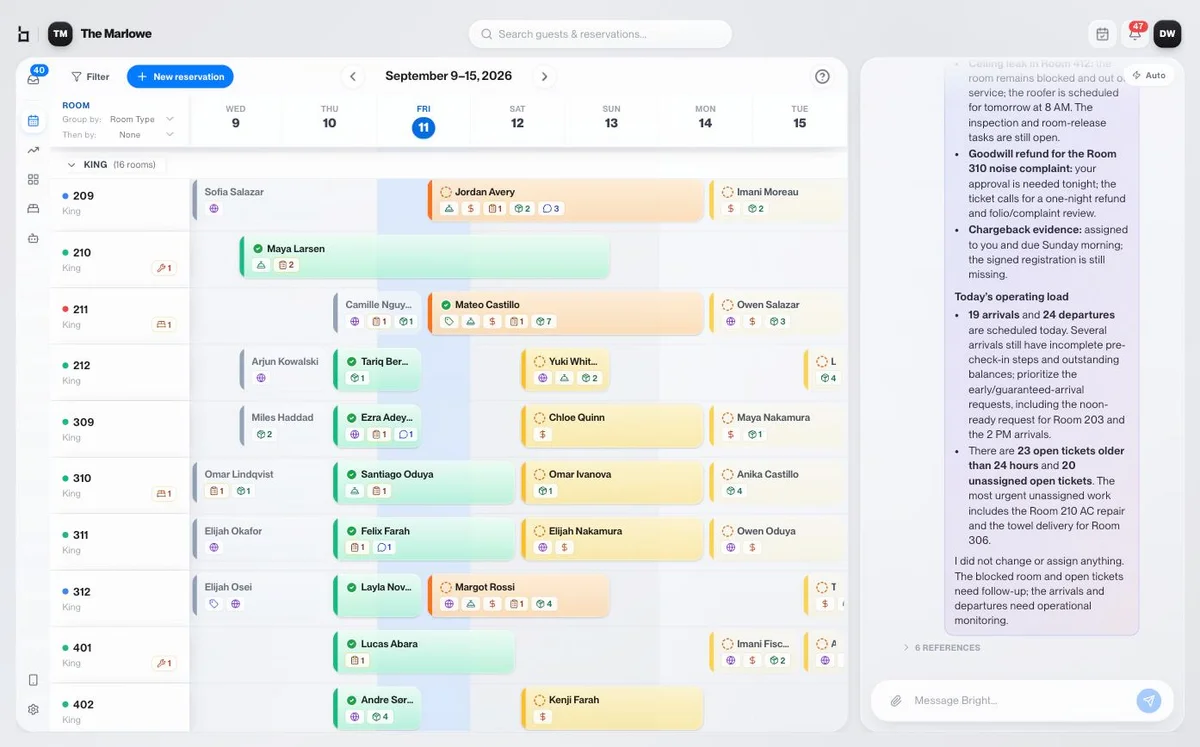
RESERVATION CALENDARThe reservation calendar
The reservation calendar
becomes an operating view.
Bright Workspace connects reservations with live room status, guest information, add-ons, tickets and operational context — so the calendar shows more than where someone is sleeping.
ReservationsDAY WEEK
Arrivals08Departures06In house42Add-ons04Open tickets06
RoomMON 25TUE 26WED 27THU 28
101
Standard · cleanGuest A2 nights · direct
Standard · cleanGuest A2 nights · direct
203
Suite · dirtyGuest Bopen ticketRoom moveattention
Suite · dirtyGuest Bopen ticketRoom moveattention
205
Suite · inspectedGuest Anew roomIn houseadd-on
Suite · inspectedGuest Anew roomIn houseadd-on
ReservationIn houseNeeds attentionRoom move
SEARCH THE HOTEL
Find the guest, reservation or room in seconds.
Search by guest name, phone, email, confirmation number or room — including from mobile.
Search→Guest→Reservation→Room→Current work
⌕ Guest A ⌘ K
3 RESULTS IN PROPERTY ONE
GAGuest Aguest.a@example.test · 2 reservationsGUEST
101Room 101Standard · Guest A · cleanROOM
!Ticket #204Room 203 · HousekeepingWORK
GA
Guest ARoom 101 · staying until 27 Aug
⋯SMSWhatsAppEmailPhotosVideoFiles
Write a reply… ↗
GUEST COMMUNICATION
One guest. One conversation. Every channel.
SMS, WhatsApp and email appear in one guest thread, so the team sees the full conversation without switching systems.
GuestBright Concierge / AIAutomationNamed staff member
The channel changes. The guest context stays together.TICKETS & TASKSTurn hotel issues into
Turn hotel issues into
visible, owned work.
Guest requests, housekeeping work, maintenance issues and operational exceptions become tickets with clear ownership, tasks, context and history.
06 Open02 Escalated04 Today
Room 203 · TowelsHousekeeping · Guest AHIGH
Pool deck · LightEngineering · Common areaOPEN
Room 101 · Extra towelsGuest Experience · AutomationASSIGNED
TICKET #204
Room 203 · Guest request
Created by AutomationOWNERHousekeepingDUEToday · 10:30ROOM203STATUSOpen
Deliver two extra towelsAssign
Confirm with Guest ADue
Tickets can also be created against common areas: pool deck · rooftop · garage
GA
GUEST PROFILE
Guest A
Guest-first search · Property OneSUMMARY
Prefers a quiet room. Returning guest. Last stay included late checkout.
STAY HISTORY
2 staysRoom 101 · Aug 2026Current
1 stayRoom 104 · May 2026Complete
GUEST PROFILES
Know the guest before the next interaction.
Bright Workspace maintains one guest profile across stays, carrying forward the context the team needs to serve that person appropriately.
- Full stay history and written guest summary
- Every reservation associated with the guest
- Tags visible across calendar, reservation and tickets
- Add another guest to the room and give them their own key
RESERVATIONGuest A · #BR-2041Confirmed
STAY25–27 August 20262 nights · 1 room · Property One
ROOMS & GUESTSRoom 101 · Guest ARoom 203 · Guest B
FINANCIAL CONTEXTRate plan · DirectAdd-on · Late checkout
Assign roomMove roomCheck inPaymentsAdd guestMore actions
RESERVATION ACTIONS
Manage the stay from the same place you see it.
Open a reservation and change what needs changing without leaving the operating context. Actions sync back to the connected PMS automatically.
- See every room and assigned guest
- Check in or out a single room
- View rate plan, add-ons and payments
- Change dates with price change shown first
- Assign, move or auto-assign rooms
- Save a card or adjust the deposit
BRIGHT COPILOTAsk about the hotel.
Ask about the hotel.
Or tell BrightOS what to do.
Bright Copilot sits beside Bright Workspace and understands the context of what the staff member is looking at.
“Who’s arriving today?”“Which rooms are still dirty?”“Open high-priority tickets.”“What needs my attention?”
Bright CopilotWorkspace context
Move Guest A from Room 203 to Room 205.
BRIGHTOS
Room updated. New access issued. Previous access revoked.
Reservation and access synced ✓Ticket actionsRoom statusReservationsAccess
BUILT FOR THE WAY TEAMS WORKBrightOS works where
BrightOS works where
your team works.
WEB is the full BrightOS operating interface. PHONE keeps the team connected around the property. WHATSAPP / MESSAGING supports staff workflows without asking every employee to learn another complex interface.
Property OneOperating view
ARRIVALS 08ROOMS 31 / 42
BrightOSToday
Guest A · Room 101Room 203 · Dirty
Property One
What needs attention?Room 203 · Open ticketGuest A · Arriving
WEB · Full operating interfacePHONE · Around the propertyWHATSAPP / MESSAGING · Supported staff workflows
SWITCH PROPERTYProperty One ⌄
Property One42 rooms · 08 arrivalsCurrent
Property Two28 rooms · 04 arrivalsSwitch
One loginSeparate tabsPer-property alerts
MULTI-PROPERTY
One operating model across every property.
Teams managing multiple hotels can work with one login and switch between properties while BrightOS keeps permissions and operational context separated correctly.
- One login and multi-property switching
- Safe use with two properties open in separate tabs
- Per-property notification preferences
CONTROL & ACCOUNTABILITYEvery action
Every action
has an owner.
Role-based permissions, clear authorship and a full audit trail keep the hotel in control even as more routine work becomes automated.
Activity logProperty One · Today
M. Lee moved Guest A to Room 205Staff action · Reservation #BR-204109:45
Bright Copilot updated room statusAI action · Room 203 → Dirty09:42
Automation created Ticket #204Source recorded · Guest conversation09:42
HOW THE WORK CHANGESStop watching software.
Stop watching software.
Bring the work together.
People watch multiple systems.
- Watch the PMS
- Check room status elsewhere
- Look for guest messages
- Manage task lists
- Move between screens
- Manually connect the context
→
The work comes together.
- See the live hotel state
- Connect reservations with room status
- Keep guest communication together
- Surface tickets and tasks
- Act from the same context
- Put Copilot beside the work
Your team should not spend the day watching software. Bright Workspace brings the work that matters to them.
PRODUCT STATUS
Bright Workspace — Available now
Live areas include day view, reservation calendar, guest conversations, tickets, guest profiles, reservation management, notifications, mobile/tablet installation and multi-property workflows.
PART OF BRIGHTOS
The operating view where BrightOS comes together.
BrightOS is the platform. This is the shared operating view for the products and workflows that keep the hotel moving.
01Bright CopilotStaff assistance and actions
02Bright ConciergeGuest communication and requests
03Bright Check-InArrival status and check-in
04Bright AccessGuest and staff keys
05Housekeeping & EngineeringTickets, room status and assignments
06AutomationsEvents triggering messages and work
07Folio & PaymentsReservation financial context
08Bright BlueprintsManager reporting
THE NEXT STEPReady to run the hotel
Ready to run the hotel
from one place?
See the hotel, the guest and the work in one shared operating view — with BrightOS handling more of the repeatable actions behind it.