
Manage operational work.
- Create, update, assign, escalate and close tickets
- Create and close tasks, add comments and attachments
- Use @mentions, automatic sources and authorized hotel-wide search
Bright Copilot is the staff AI built into BrightOS. It understands the hotel, sees the context your team is working in and can perform real operational actions — from updating rooms and reservations to managing tickets and issuing access.
Traditional AI stops at conversation. Bright Copilot can use hotel context to perform the next operational action inside BrightOS.
Ask. Act. See the result.
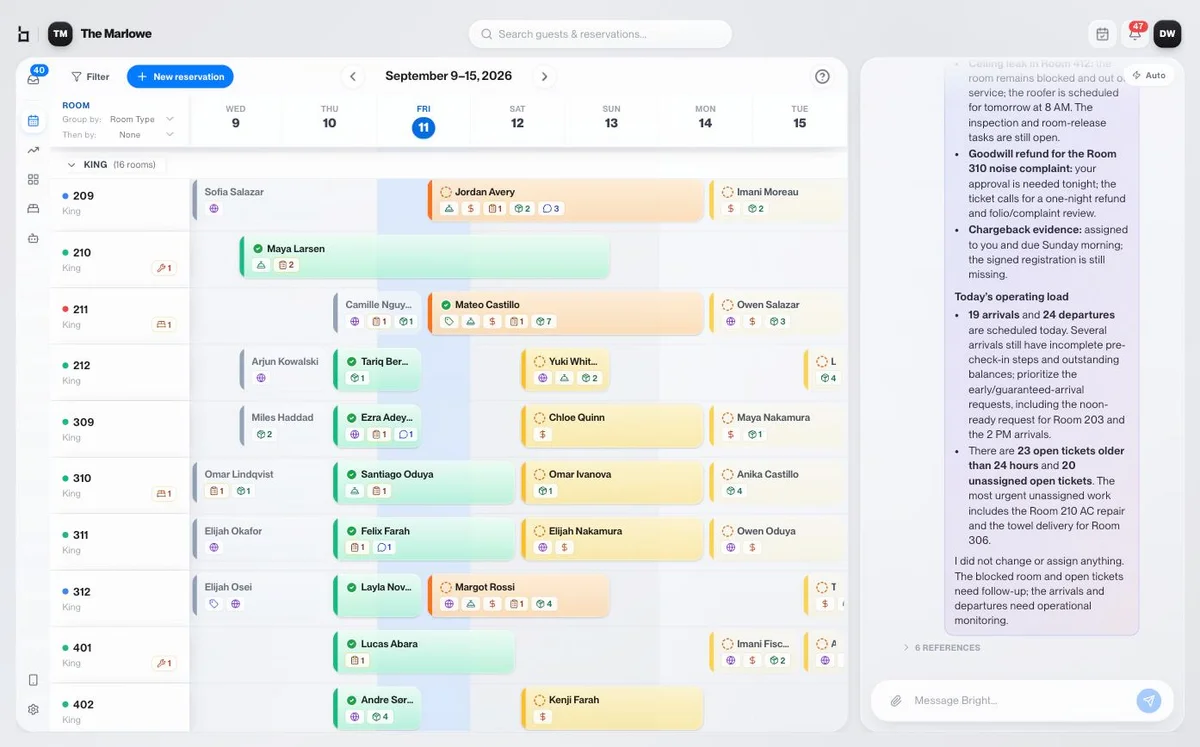
Bright Copilot sees the context of the BrightOS screen beside it, so staff do not need to repeatedly explain which guest, room or reservation they are talking about.
When Bright Copilot performs an action, it shows what it did directly in the conversation and links the team to the result.
The connected reservation and access workflow has been updated.
AI action without hidden AI behavior.
Bright Copilot is live for the operational work that staff and managers need to find, update and complete inside BrightOS.
Use Copilot in the operating view or reach it through the staff channels already connected to BrightOS.
Copilot stays available beside the reservation calendar with context about arrivals, departures, rooms to turn and operational work.
Authorized staff can text the hotel’s own number from a registered phone. No separate login screen or new app to install.
WhatsApp access is available with staff-language preferences in English and Spanish.
Housekeepers, engineers, guest-experience staff and managers can interact with BrightOS from the device already in their pocket.
The interface becomes a direct way to ask about the hotel operation and complete supported work.
3 rooms on floor 3 are still dirty.
Room 203 · Room 302 · Room 305The software operates. The team supervises.
Bright Copilot inherits BrightOS role-based access. Context and actions are scoped to each person’s responsibilities.
More automation does not mean less control.
Copilot actions happen within hotel permissions and remain visible in BrightOS, so staff can understand what changed and why.
The staff member asks once. BrightOS completes the connected reservation and access work that is supported by the current workflow.
The staff member asked once. BrightOS handled the connected work.
Bright Copilot can perform ticket operations across multiple rooms, helping teams handle repetitive operational work without repeating the same interface action.
Bright Workspace provides the live hotel context. Bright Copilot provides a faster way to understand it and act on it.
Find the reservation
→ open the correct screen
→ find the setting
→ update the record
→ check the result
“Check Guest A out.”
BrightOS
Checkout complete.
Today, staff ask Bright Copilot questions and tell it what to do. BrightOS is also developing the ability for Copilot to notice what needs doing and act before being asked.
Copilot is part of the platform and acts within its operating context — not another AI tool sitting outside it.
Give staff a faster way to understand the hotel and perform the work that needs doing.